I have written about LyX, RStudio, Emacs Org-mode and Eclipse. There are still other editors that we can use with knitr, such as Texmaker and WinEdt. The key is that you call R and load the knitr package, then call the function knit() or knit2pdf().
Texmaker
You can define a custom command to process Rnw documents by User --> User Commands --> Edit User Commands:
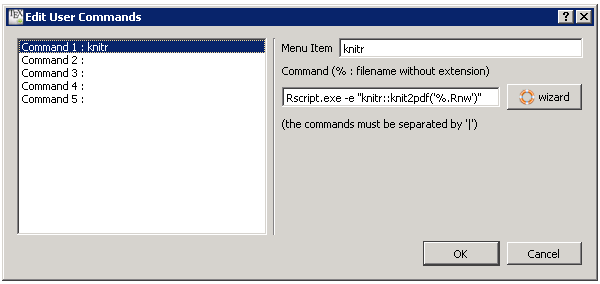
Note if you have not added R’s bin path to the PATH variable, you need to use the full path to Rscript.exe in the above command like:
"C:/Program Files/R/R-2.14.2/bin/Rscript.exe" -e "knitr::knit2pdf('%.Rnw')"
If you do know where is Rscript.exe, simply open R and use R.home('bin') to find it. Then for an Rnw document, you can use this knitr command to compile it:
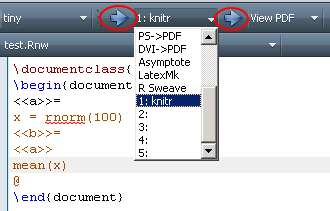
Click the arrow on the left to compile the document, and the right arrow to view PDF. Of course the above configuration is for Windows, but it is straightforward for other systems as well: change Rscript.exe to Rscript (in fact you can use Rscript under Windows as well).
TeXStudio
For one, you can do basically the same thing as in Texmaker (thanks, Henrik Nyhus and Paul J. Hurtado):
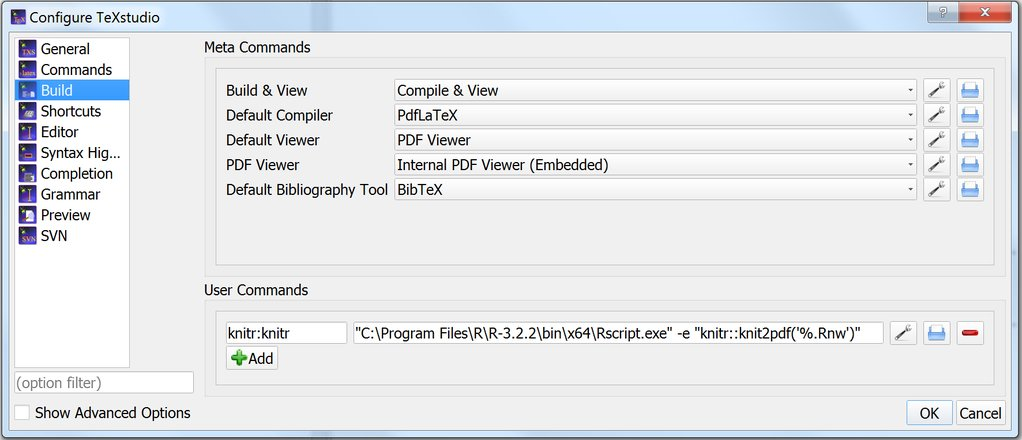
If you reveal Advanced Options (bottom left), you’ll also see Commands ($PATH) at the bottom, where you can input the path to your R folder (e.g. C:\Program Files\R\R-3.3.2\bin\x64, no quotes); then the user command (and other calls to knitr that you might want in other commands) can just be Rscript.exe -e "knitr::knit2pdf('%.Rnw')".
Every time you run this user command (hotkey Alt-Shift-F1), you’ll run knitr and silently generate the PDF; you’ll need to hit F7 every time to refresh the viewer. Alternatively, you can add | txs:///view-pdf to the end of the command - the pipe character separates different commands you want to run one after another, so it’ll basically hit F7 for you.
This is still pretty inefficient, however, if you’re using a citation package like BibLaTeX; you’ll need to keep running the bib file manually before compiling, and you may need to manually compile at least twice (and you might not be able to tell how many times you need), which will also call the viewer unnecessarily in the middle. TeXstudio is already great at compiling and/or running the bib tool and repeating however many times is needed when you hit Build & View (F5), and you can continue to make use of that with knitr by replacing the default compiler with the Rscript.exe -e "knitr::knit2pdf('%.Rnw')" command (assuming you already set the R folder $PATH). Make sure the “Repeat contained compilation commands” button next to it remains pressed.
This, of course, will make TeXstudio run off knitr instead of the standard LaTeX compilers by default, at least when you hit F5 (or F6); probably the only downside to this, for most people, is that it can make debugging your LaTeX code more difficult, as most errors will only give you the ambiguous warning that texify.exe “had status 1” (running knitr via user command doesn’t improve that either). The log file is sometimes still useful, though even when it is, it refers to lines in the .tex file that knitr produced, and not the .Rnw file, so you need to open that file up and try and figure out what’s wrong.
Overall, though, TeXstudio does allow you to use knitr while taking advantage of all its other LaTeX-writing perks; moreover, it makes it a lot easier to use Biber-based citation packages like BibLaTeX-Chicago, compared to RStudio which requires some awkward workarounds.
WinEdt
The WinEdt mode R-Sweave supports knitr now. Please read on if you want to configure WinEdt by yourself instead.
The following instructions were from Phil Chalmers, and I did not test them at all, but I feel it should be in the ballpark.
- Go to
Options -> Execution Modes -> PDFTeXify. Then look for executableRscript.exe(e.g.C:\Program Files\R\R-2.14.2\bin\Rscript.exe) and select that. - under
Switchesput-e, and underParametersput"knitr::knit2pdf('%n%t')"
Now hitting F9 will run everything for you at once, including opening up the PDF.
Thanks, Phil.
Emacs/ESS
Since 12.09, knitr has been officially supported in ESS. If you are using Debian/Ubuntu, you can install it by
sudo apt-get install ess
Here is a short video showing how to use knitr in ESS.
(For historic interest only) Both Simon Potter and lucialam have blog posts about Emacs/knitr.
Gedit
You can define external tools in gedit. Thanks to the tip from David Allen below, you may knit a document via
Rscript -e "library(knitr); knit('$GEDIT_CURRENT_DOCUMENT_NAME')"
Sublime
The KnitrSublime package by Andrew Heiss provides very rudimentary LaTeX support for knitr in Sublime Text 2.
Vim
The Vim-R-Plugin has comprehensive support to knitr thanks to Jakson Aquino.
TextMate
See #252 for one approach with Applescript for TextMate 2, and the knitr.tmbundle repository by Chris Fonnesbeck.
TeXShop
It is easy to configure TeXShop to work with knitr; just save the code below as a file Knitr.engine under the Engines directory of TeXShop (usually ~/Library/TeXShop/Engines/):
#!/bin/bash
export PATH=$PATH:/usr/texbin:/usr/local/bin
Rscript -e "library(knitr); knit('$1')"
latexmk -pdf "${1%.*}"
Courtesy of Cameron Bracken and Fabian Greimel.
TeXworks
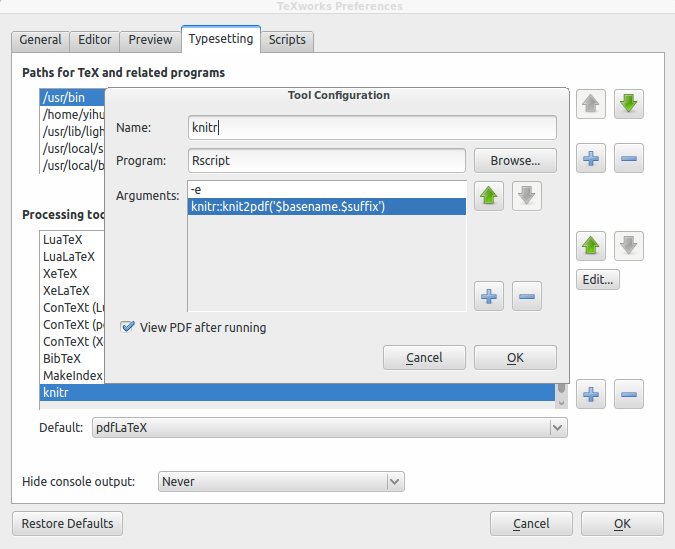
TeXworks is similar to Texmaker in terms of configuration for additional tools. Below is a screenshot of the configuration under Ubuntu, thanks to Speravir for the answer on StackExchange (Windows/Mac OS should be similar, as long as Rscript is in PATH).
Kile
The following method was pointed out by tirip01 in the comments below:
-
Open the
Buildtab, selectNew.., typeknitrand pressFinish. In theGeneraltab enterRscriptin theCommandfield. Below, in theOptionsfield type:-e "knitr::knit2pdf('%source')"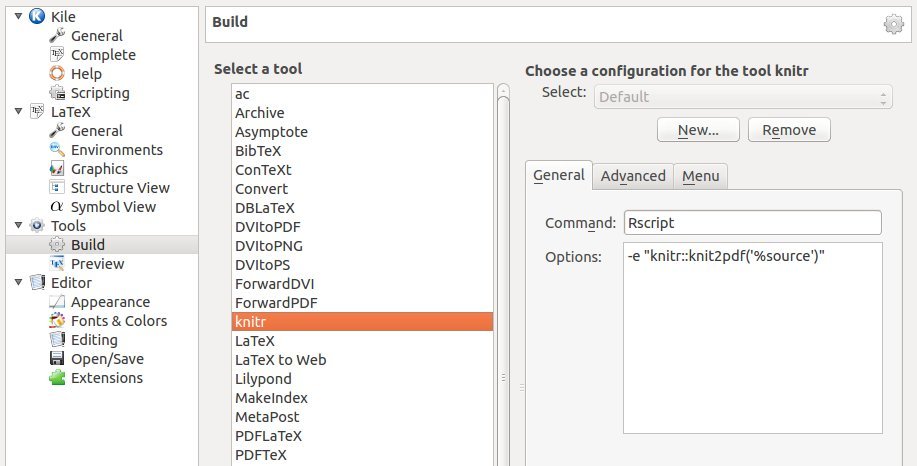
-
Go to
Advancedtab and set Rnw asSource extensionand pdf asTarget extension.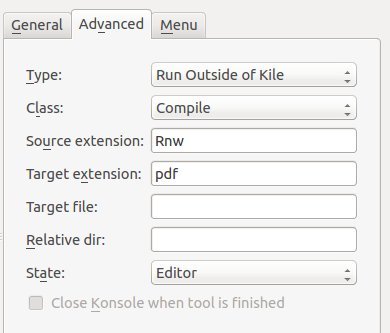
-
In menu select
Compile
Dr Marek Gągolewski also has a blog post Configure Kile for knitr under GNU/Linux, which describes a more complicated approach.
Tinn-R
Tinn-R started to support knitr since v2.3.7.3.