Warning: as one of the readers pointed out in the comments below, this post may not be really helpful if you want to read Excel files into R, so please read at your own risk!
As Sir Francis Bacon said, “Histories make men wise; poets witty; the mathematics subtile1; natural philosophy deep; moral grave; logic and rhetoric able to contend.” And Windows stupid.
He should have added the last sentence if he were a Windows user in this age.
1. Avoid Using M$ Excel
A lot of R users often ask this question: “How to import MS Excel data into R?” Well, my suggestion is, avoid using M$ Excel if you are a statistician (or going to be a statistician) because you just cannot imagine how messy Excel data can be: some cells might be merged, some are colored, some texts are bold, several data tables can be put everywhere (e.g. cell(1,1) to (10,4), and (17,3) to (25,9)), stupid bar plots and pie charts are inserted in the sheets, silly statistical procedures that are wrong forever… If you don’t trust my words (yes, I’m a nobody), just read the examples here: Problems with Excel (collected by Prof Harrell).
I know there are reasons for you to continue using Excel. Your boss required you to do so; you don’t have time to learn more about various data formats; everybody is using Excel, and you don’t want to be so cool to use R; or if you finish your tasks too quickly and accurately, your boss will doubt whether you have really spent time on working, hence you will get less money paid (this is a REAL story for me - though I didn’t get less payment, I was indeed doubted when I used R); …
2. Data as Pure Text
A quick solution to the problem is to save your Excel data in a pure text format, e.g. CSV (comma-separated value) or tab-delimited. If you have ever thumbed through Dr Murrell’s book “Introduction to Data Technologies”, you probably know that the CSV format is NOT an Excel-specific format, although Windows users always find the Excel icon is associated with the *.csv files. Pure text is a ridiculously simple data format, but it’s amazing that there are still many people who do not know anything about it. The basic idea is to separate data columns with a delimiter (e.g. , or ;) and rows with a usual line-break symbol (e.g. carriage-return, which can be different in Windows and Linux). In this case, we can identify all data values as we do in the spreadsheet. Here is an example with data in a spreadsheet:
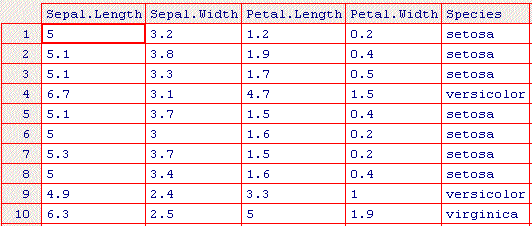
If we save this data as a CSV file, and open it with a pure text editor (e.g. Notepad), we will see:
"","Sepal.Length","Sepal.Width","Petal.Length","Petal.Width","Species"
"1",5,3.2,1.2,0.2,"setosa"
"2",5.1,3.8,1.9,0.4,"setosa"
"3",5.1,3.3,1.7,0.5,"setosa"
"4",6.7,3.1,4.7,1.5,"versicolor"
"5",5.1,3.7,1.5,0.4,"setosa"
"6",5,3,1.6,0.2,"setosa"
"7",5.3,3.7,1.5,0.2,"setosa"
"8",5,3.4,1.6,0.4,"setosa"
"9",4.9,2.4,3.3,1,"versicolor"
"10",6.3,2.5,5,1.9,"virginica"
Or save as tab-delimited text:
""	"Sepal.Length"	"Sepal.Width"	"Petal.Length"	"Petal.Width"	"Species"
"1"	5	3.2	1.2	0.2	"setosa"
"2"	5.1	3.8	1.9	0.4	"setosa"
"3"	5.1	3.3	1.7	0.5	"setosa"
"4"	6.7	3.1	4.7	1.5	"versicolor"
"5"	5.1	3.7	1.5	0.4	"setosa"
"6"	5	3	1.6	0.2	"setosa"
"7"	5.3	3.7	1.5	0.2	"setosa"
"8"	5	3.4	1.6	0.4	"setosa"
"9"	4.9	2.4	3.3	1	"versicolor"
"10"	6.3	2.5	5	1.9	"virginica"
Then use read.table() or read.csv() in R to read these pure text files (as data.frames).
A hint for lazy users: you can also select all the data cells, copy it (into clipboard) and use read.table("clipboard") to get the data into R. In this case, what exists in your clipboard is the tab-delimited pure text.
3. What If I Insist on Using Excel
All right, you don’t bother to save the excel sheet into pure text and even don’t want to copy it into clipboard, then you can treat Excel files as databases, although they are indeed bad databases. You must guarantee that the data is “clean” and well-formatted, i.e. observations in each row and variables in each column (no merged cells, better no graphs). We can use the RODBC package to establish a connection to the Excel file, and execute SQL commands in the connection to make queries to data. Functions related to this task are odbcConnectExcel() or odbcConnectExcel2007() (again, Excel is stupid – they always change the standard in order that their products can be inconsistent). This is described in details in the manual R-data (“R Data Import/Export”).
As *.xls (or *.xlsx) is a binary format, never try to read.table("*.xls"). Meanwhile, read.xls() in the gdata package might be what you want if you are looking for the read.*-style R functions. (Thanks, Doug!)
In most cases, pure text format suffices to work, although it is ridiculously simple. Take a look at the “source code” and you will know everything. By the way, the extension of a file name is not that important: *.csv does not have to be a comma-separated text file, and *.doc can be something other than a Word document. It’s just a matter of convention. Again, open it and see what on earth is inside.
-
“subtile” is Middle English; here it might be “subtle” in modern English, but the original word is more likely to be “subtile”. Thanks to our careful reader David Winsemius. ↩︎